Packsense - Week 1
Day 1: The Idea Gets a Shape
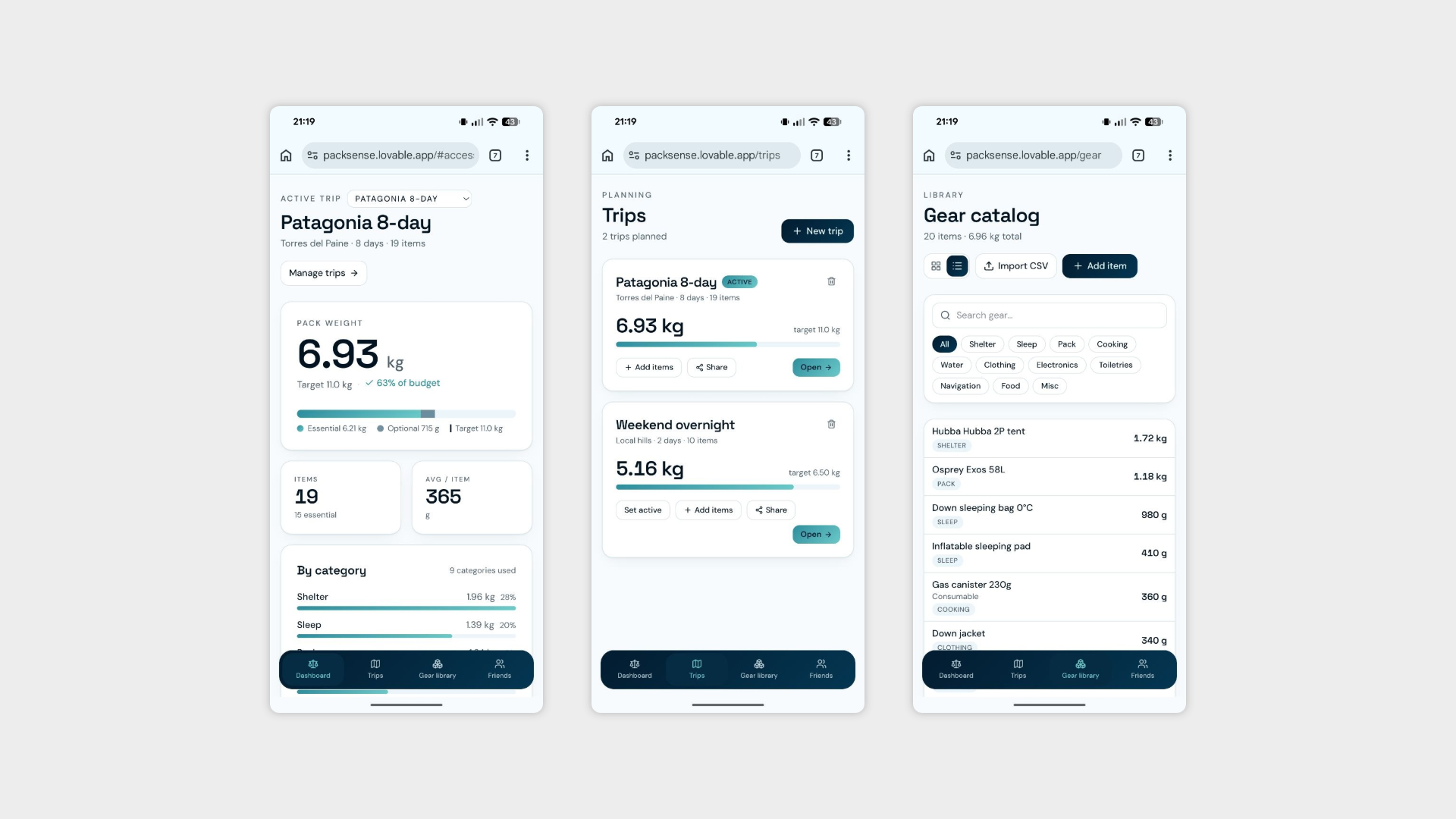
For Packwise, Day 1 was about capturing the vision before the details get in the way — defining what the app actually needs to do and sketching out a first rough idea of what it might look like.
What I worked on:
Defining the initial needs — Mapping out the core problem the app solves and what the essential features need to be to make it genuinely useful. What does a user actually need from a packing planner? What makes one trip different from another?
First rough design — Not pretty, not final, not meant to be. A first pass at the layout to get ideas out of the head and onto the screen, where they can be properly questioned.
Naming the app — Landed on Packwise. Practical, clear, and just self-aware enough to suggest the app actually knows what it's doing. Even if, at this stage, it very much doesn't yet.
Day 1 is always the easiest and the hardest — everything is possible and nothing works yet. A good place to be.
Day 2: Going Social
If Day 1 was about defining the vision, Day 2 was about building the feature that might just be the heart of the whole app. Packing for a trip alone is one thing — packing with other people, without ending up with four portable chargers and zero first aid kits between you, is where Packwise starts to get interesting.
What I worked on:
User authentication — Before anything social could exist, users needed accounts. Set up the login system as the foundation for everything that followed.
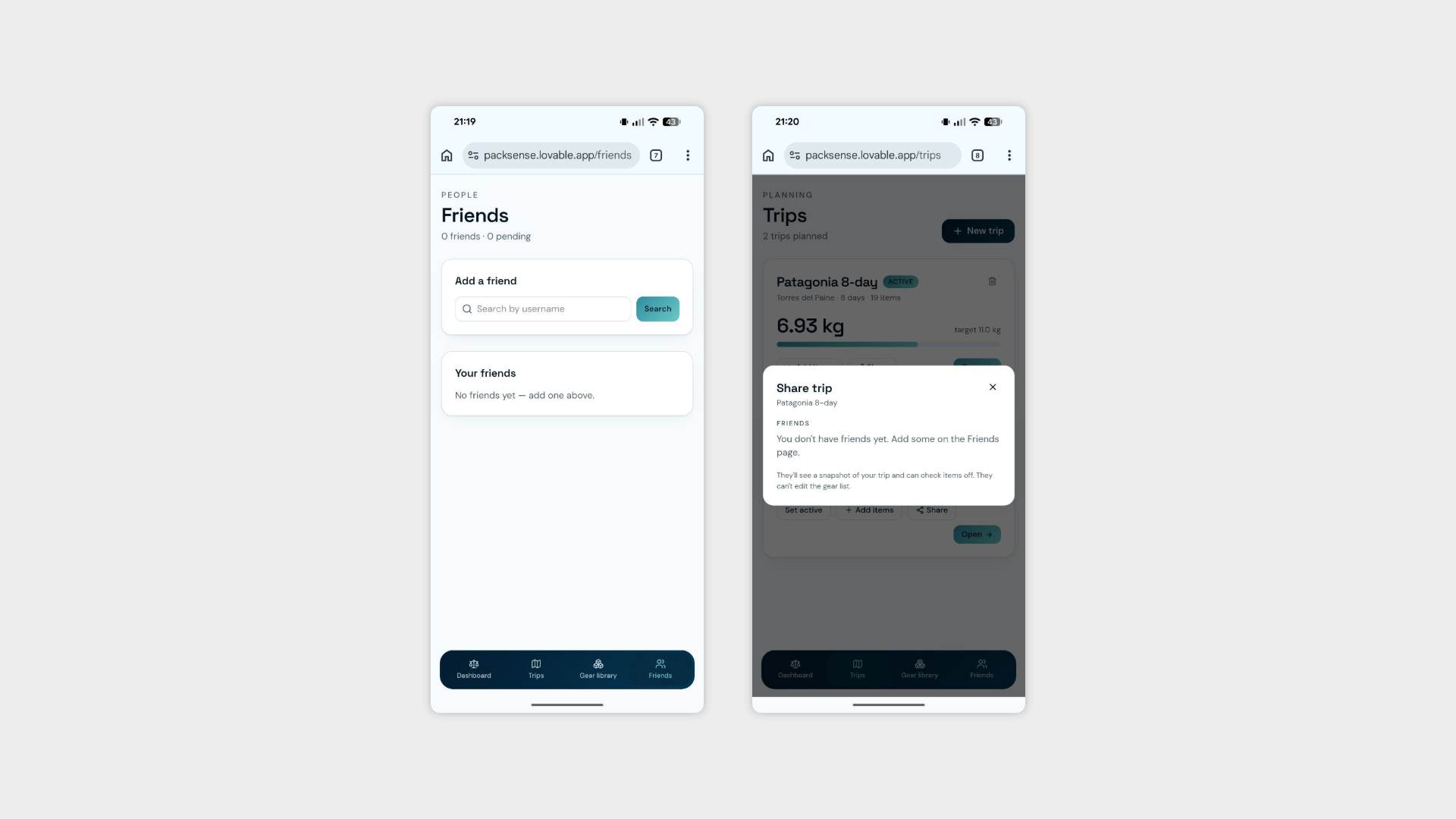
Friendship / following system — Built the social layer that connects users to each other, allowing them to find and follow friends within the app.
Trip sharing — The main event. Users can now share a trip with friends and collaborate on building the perfect packing list together. The goal is simple: avoid duplicates, cover the gaps, and collectively show up with exactly what's needed and nothing more. Anyone who has ever arrived at a campsite with three tents and no matches will understand why this exists.
UI adjustments — Removed a tilting bottom navigation that had no business tilting, along with a handful of other smaller fixes to keep the interface clean and consistent.
Day 2 punched well above its weight. Authentication, a social graph, and collaborative trip planning in a single session — either the scope was underestimated or the tools are getting genuinely good. Probably both.
Day 3: Out with the Dashboard, In with the Backpacks
Day 3 brought one of those decisions that feels obvious the moment you make it — scrapping something that looked good on paper but served no real purpose in practice. The dashboard is gone. No ceremony, no mourning. In its place, something far more useful.
What I worked on:
Removed the dashboard — It wasn't pulling its weight. A generic overview screen with nothing specific to say about a packing app is just visual noise, and visual noise is the enemy of a good product.
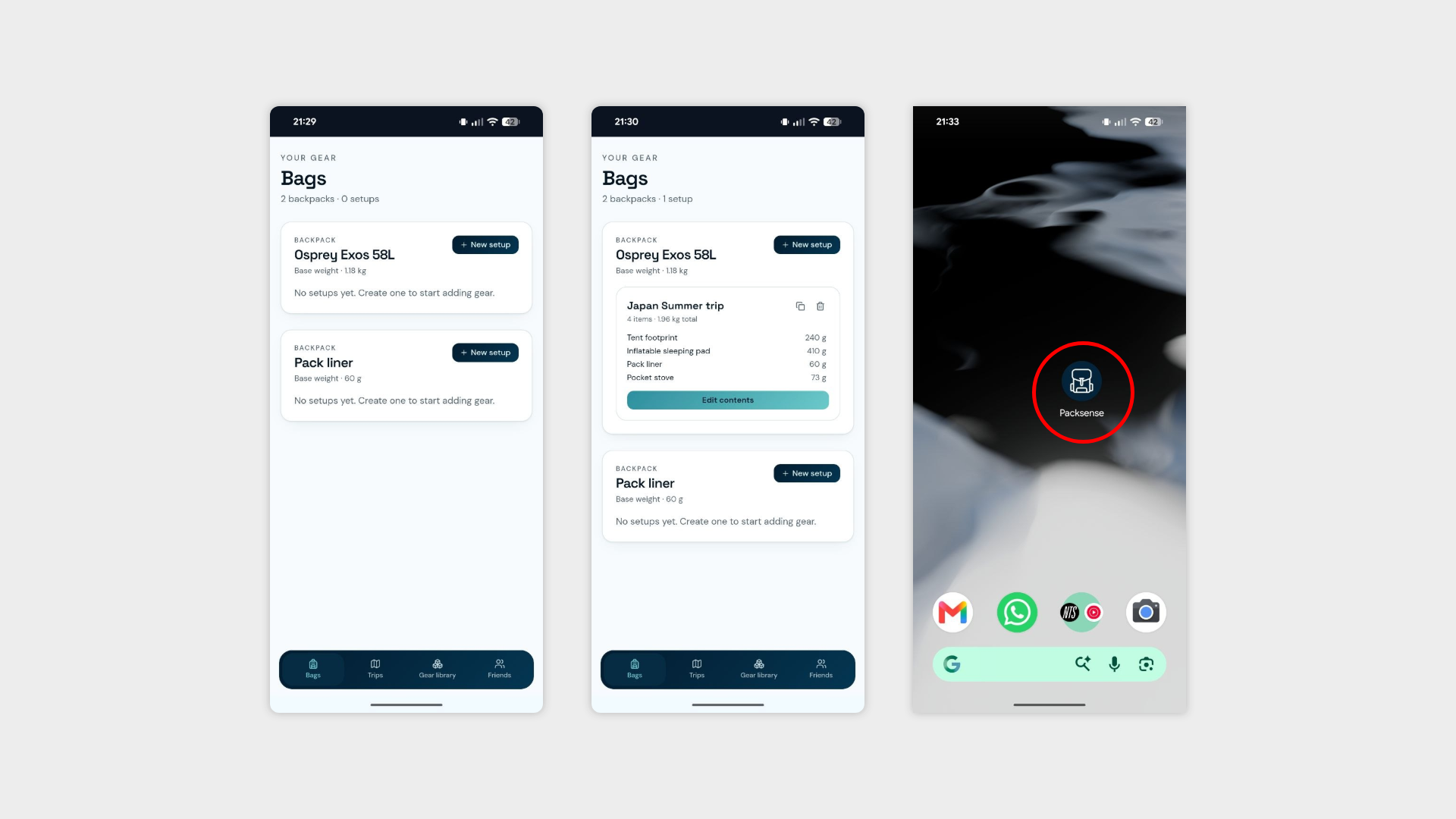
Backpacks section — The new home. Users can now build and manage their own collection of premade packing setups, covering all the scenarios that matter:
Multiple backpacks — because most people own more than one bag, and a 70L hiking pack is not the same as a carry-on.
Multiple setups per backpack — the same bag can have different configurations for different seasons, trip types, or destinations. A winter hiking setup and a summer festival setup can live side by side without conflict.
Add directly to a trip — once a setup is ready, it can be applied to a trip instantly, saving users from rebuilding the same packing list from scratch every time.
Favicon update — New icon, properly set up and looking the part.
Removed the Chrome header — That persistent browser bar had been quietly ruining the mobile experience. Gone now, and the app immediately feels more like an app.
Day 4: Fixing What's Broken and Making the App Actually Smart (Sort Of)
Not every day is about shipping shiny new features. Sometimes you spend the morning staring at a blank screen that used to show a trip page wondering where everything went. Today was one of those days.
What I worked on:
Trip page bug fix — The trip page had quietly stopped displaying anything at all, which is a fairly fundamental problem for a page whose entire job is to display things. Tracked down, fixed, and back in business.
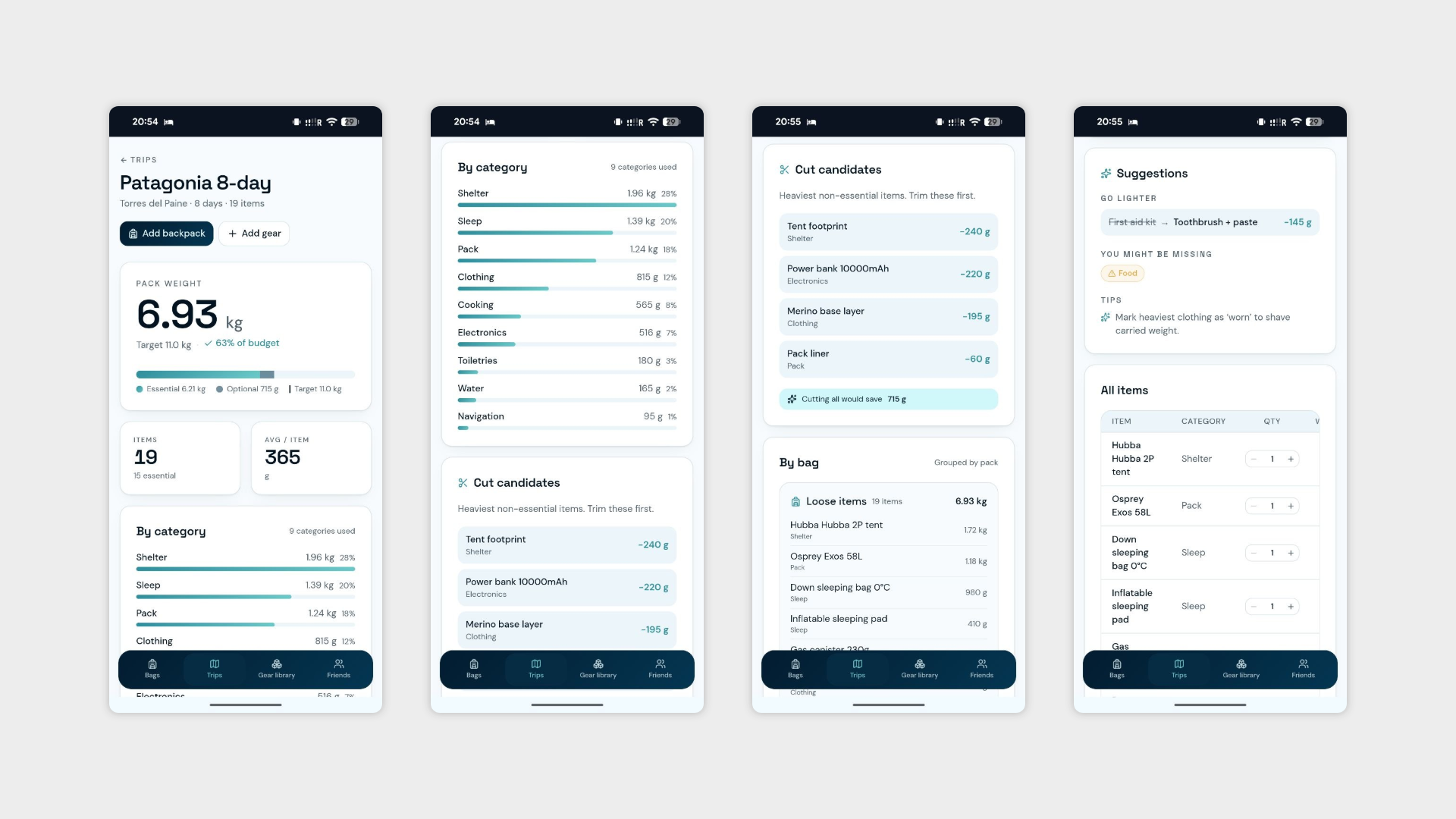
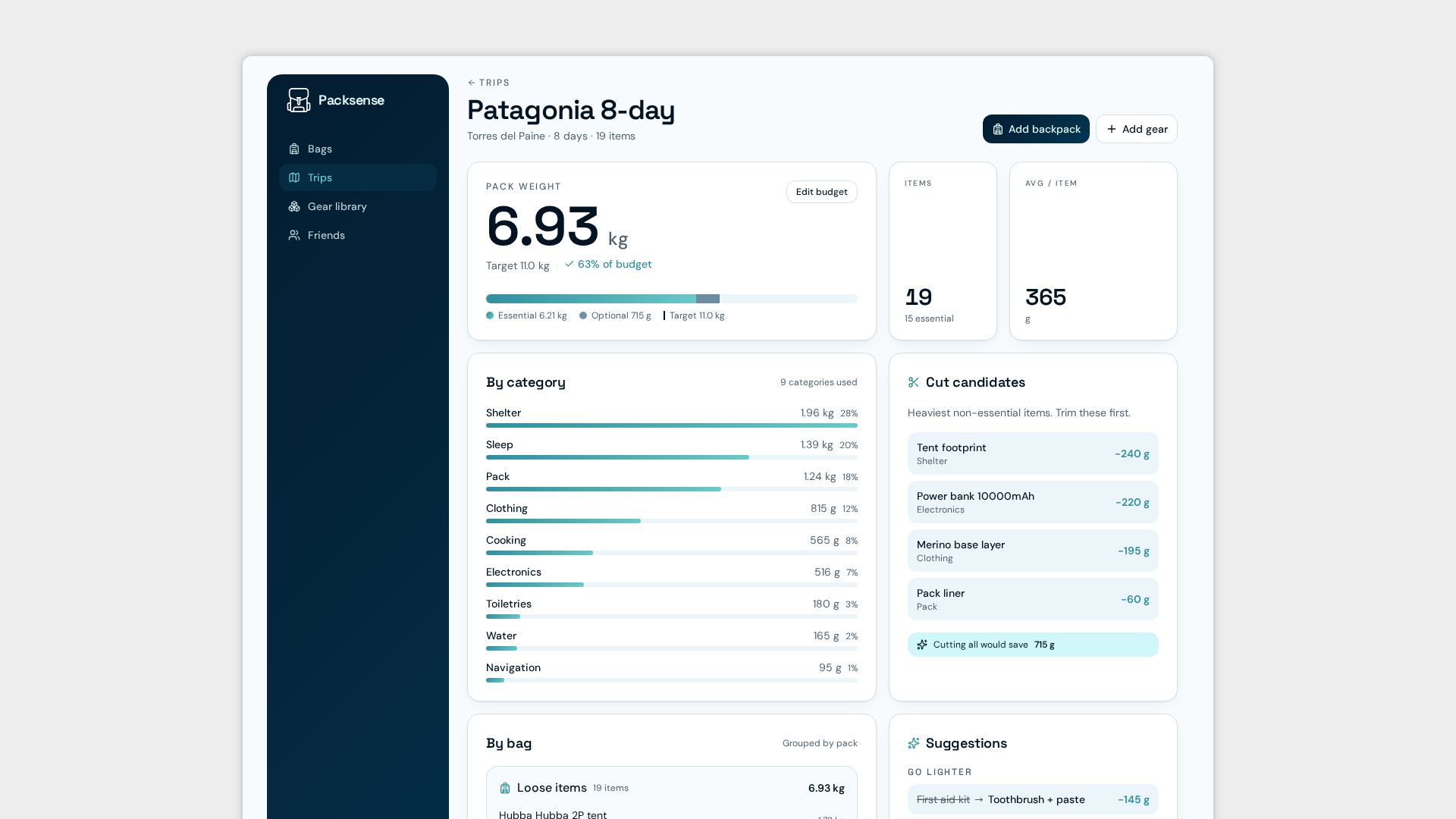
Trip page overhaul — With the page working again, it now actually earns its place in the app. A trip view now shows:
All trip details — everything relevant to that specific trip in one place.
Bags and contents — a clear breakdown of which backpacks are coming and exactly what's packed in each one.
Pack optimisation suggestions — The app now suggests items that could be cut or swapped to reduce weight and bulk. The vision is solid — show up with exactly what you need and nothing you don't. The execution, however, is still a work in progress. The suggestions are functional but the logic behind them is, charitably speaking, still finding its feet. More refinement needed before it starts feeling genuinely smart rather than confidently wrong.
Day 5: Stepping Back and Actually Using the Thing
No new features, no bug fixes, no sweeping structural changes. Day 5 was reserved for something equally important and far less glamorous — sitting down, using the app as a real user would, and seeing what holds up.
A full week of building tends to leave blind spots. Testing is how you find them.
The first iteration is rough around the edges in places, but the core is there — backpack setups, trip pages, social sharing, and the beginnings of pack optimisation logic that will hopefully get smarter before anyone judges it too harshly.
What's coming next week:
The plan heading into Week 3 is to wrap up the design of the first full iteration and get it in front of real people. Interviews start next week — same process as Budgetzilla, same healthy mix of useful feedback and magic wand requests that will never make the roadmap.
The building phase is almost done. The humbling phase is about to begin.
